April 2008 Edition
shop talk
Stopping ‘idle’ chatter

How to find harmonic imbalance between tool, workpiece
By Steve Rose
Many sounds categorize the atmosphere of a machine shop, from the whir of a grinder, to the buzz of a tool cutting the part. One preventable sound specific to a machine shop is chatter — that annoying squeal or squeak from a machine. When you hear it, you know something is wrong.
Not only do you hear chatter but you can see it in the imperfect finish on the part. Everyone experiences it, but how do we fix it?
What is chatter?
Chatter is a harmonic imbalance that occurs between the tool and the workpiece because the part and the tool are bouncing against each other.
Remember it takes two to tango, so keep in mind that chatter can be caused by the tool bouncing against the part, the part bouncing against the tool, or both. It is not always easy to determine why chatter is happening, or which piece is the culprit.
How is chatter corrected?
With some careful setup and investigation, the problem can be isolated and fixed. Here is a list of items to keep in mind when correcting chatter.
May Cause Chatter ?Should Fix Chatter
Before Machining
1. Tool setting
-
If the flat on the bar is not indicating parallel, an incorrect tool rake angle
results in chatter. Make sure to indicate the flat on your boring bar.
2. Part setting
-
If the part is not correctly supported in the chuck, chatter may be a problem. Tap the part lightly with a wrench. If the part rings like a bell it is not supported correctly.
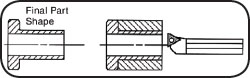
3. Final Part Shape
-
Perform boring operation prior to
turning the outside diameter of a part to decrease the risk of chatter.
During Machining
4. Overextended Bar-
The boring bar is extended excessively in terms of length-to-diameter ratio. In this case consider using an
antivibration bar.
5. Depth of cut
- Try reducing the depth of cut to reduce chatter.
6. Feed Rate
-
Both high feed rates and low feed rates may cause chatter. The first inclination with chatter is to slow down the feed. Try increasing the IPR first. An increased feed bends the bar, removing the tendency to chatter.
7. Chip Breaker style
-
The style of chip breaker may be causing excessive force. Try changing to a positive style chip breaker.
8. Bar Support
-
If the bar is not correctly supported in the turret, use an extended bush or
sleeve.
9. Surface speed-
If the cutting surface speed is not harmonized between the tool and the part material, chatter occurs. The first inclination with chatter is to slow down the speed. Try speeding it up first.
Advanced
10. Tool Pressure
-
To reduce tool pressure, change the nose radius of the cutting insert. A sharper-insert nose radius has a lower cutting force. This is often a last resort solution because changing the nose radius of the tool requires changing the part program, cutter compensation, and feed rates.
Steve Rose is a professional trainer and president of RTSI,
Solon, OH. Rosaleen Rose offers Internet website development. They can be reached by phone at 440.542.3066; e-mail
srose@rosetraining.com; or on the web at
www.rosetraining.com.
Copyright Rose Training Systems Inc., 2008
What do you think?
Will the information in this article increase efficiency or
save time, money, or effort? Let us know by e-mail from our
website at
www.ToolingandProduction.com or e-mail the editor at
dseeds@nelsonpub.com.